
How to make a monthly budget in 6 steps
Work out what comes in, separate your fixed costs, split the rest by category and review it at the end of the month. With a worked example on $3,000 a month.
Making a budget takes less than an hour, and your first one doesn’t need to be perfect. You decide where each dollar goes before the month starts, then check whether it did. These steps work for a personal, household or family budget.
Let’s use an example: someone who takes home $3,000 a month.
1. Write down what actually comes in
Use the money that reaches your account, after tax. If you get bonuses, add them up over the year and divide by twelve, or keep them for big expenses.
If your income changes from month to month, use your lowest month of the past year as your base. Anything above that goes to savings.
2. Look at what you spent over the last three months
Open your bank statements and sort your spending into broad groups. Expect a few surprises, usually in eating out, online shopping and subscriptions. That real number is your starting point, and it’s far more reliable than what you think you spend.
3. Take out your fixed costs first
Rent or mortgage, utilities, internet, insurance, gym. This money already has a job. Yearly and quarterly payments count too: turn them into a monthly cost with the recurring expenses calculator and set that amount aside every month.
4. Split the rest by category
Six or seven categories are enough. Here’s our example:
| Category | Per month |
|---|---|
| Housing | $1,200 |
| Food | $450 |
| Utilities | $180 |
| Transport | $200 |
| Fun | $250 |
| Savings | $400 |
| Other | $170 |
| Total | $2,850 |
That leaves $150 unallocated. You can keep it as a buffer or raise your savings. If you don’t know where to start, the 50/30/20 rule gives you a first benchmark. You can run these numbers in our monthly budget planner.
5. Treat savings like a bill
If you save whatever’s left at the end of the month, many months there won’t be anything left. Schedule a transfer for payday and budget with what remains. If you don’t have a cushion yet, start with an emergency fund.
6. Log your spending and review at month end
This is where most budgets get abandoned. Logging each expense on the spot takes seconds, but if you leave it until Sunday, you’ll forget half of them.
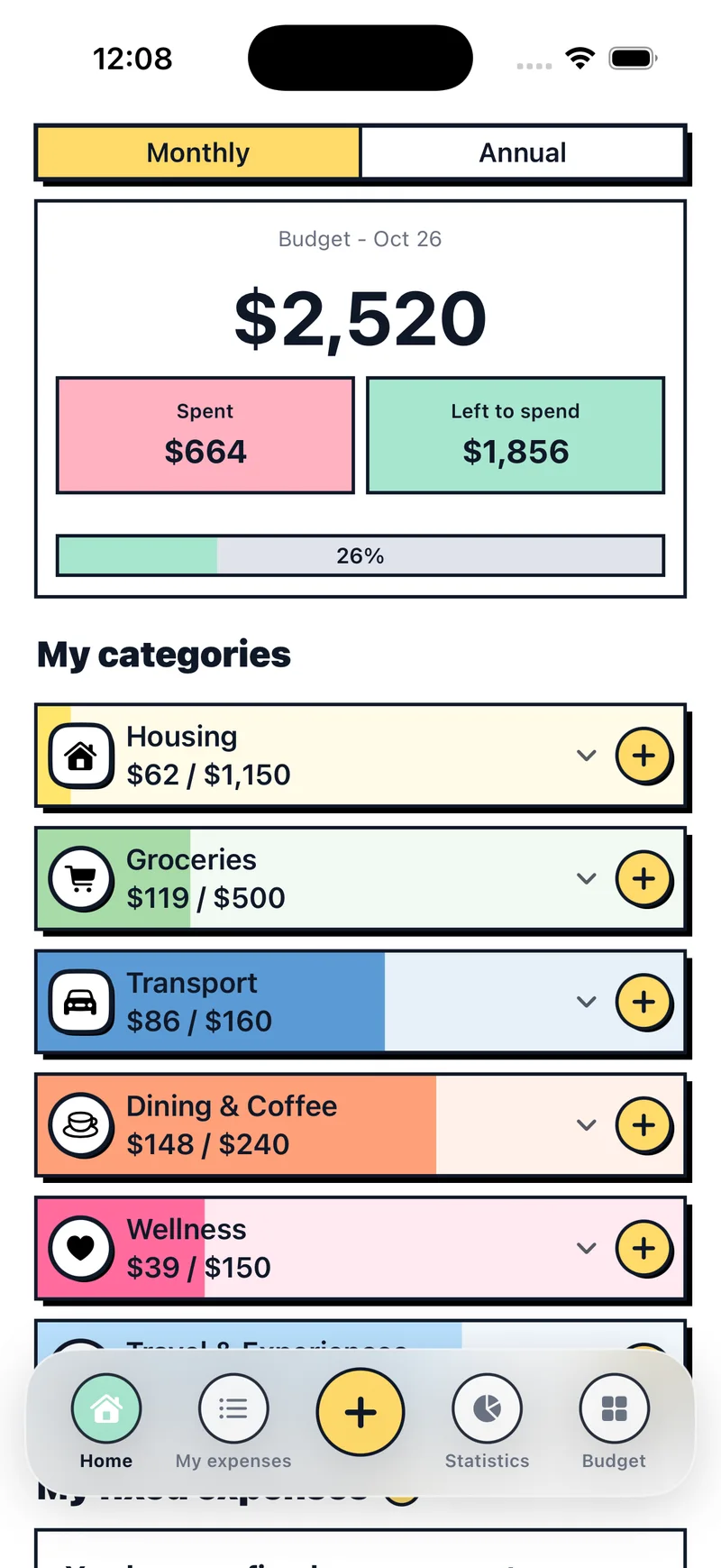
In Budget Pop you tap +, type the amount and pick the category. Each category fills with color, so you can see what’s left without doing any math.
At the end of the month, compare the plan with what you spent. If you’ve gone over on food three months running, that budget isn’t realistic: raise it and cut something else.
Common mistakes
- Forgetting expenses that aren’t monthly. Car insurance, holiday gifts and annual servicing come round every year. Give them a category.
- Being too optimistic. If you spend $600 on food, a $300 budget will last a week. Bring it down gradually.
- Having too many categories. If you hesitate every time over where something goes, you have too many.
- Giving up after one bad month. A month with a car repair or a vacation doesn’t ruin anything. Next month you start again.
Source: Consumer.gov, Making a Budget. Figures are an example.